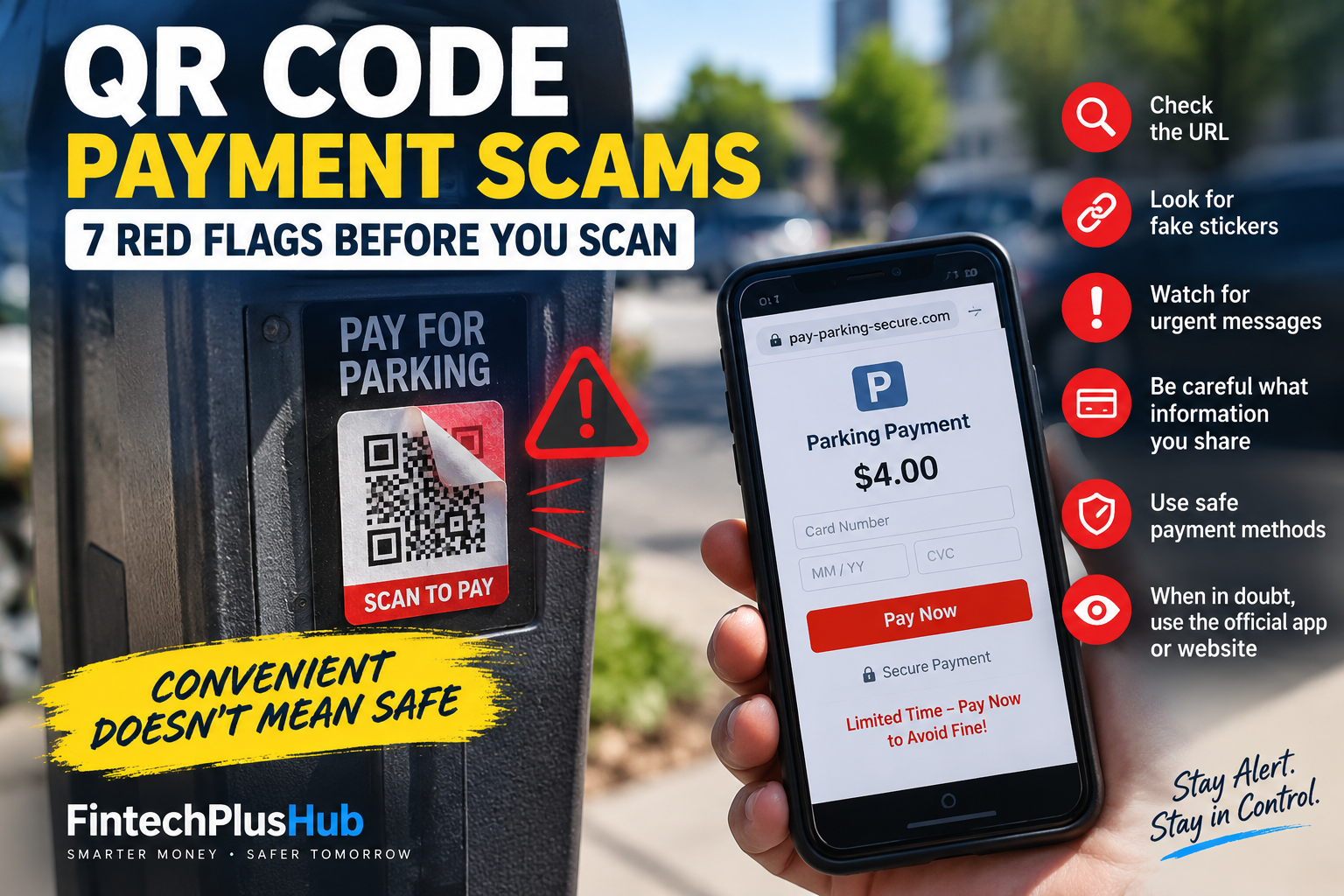
QR Code Payment Scams: 7 Red Flags Before You Scan
QR codes have made paying for parking, restaurant bills, tickets, and other services incredibly convenient. Point your phone at a square code, tap a link, enter your payment details, and you are done.
That convenience creates a problem: you cannot see where a QR code leads just by looking at it.
A legitimate-looking QR sticker can send you to a fake payment page designed to collect your card details, passwords, or other personal information.
This is not just a theoretical risk. In September 2026, the Federal Trade Commission warned consumers about reports of scammers placing fraudulent QR codes over legitimate QR codes on parking meters. Scanning the replacement code could lead to a fake website built to steal money or personal information. https://consumer.ftc.gov/consumer-alerts/2026/09/see-qr-code-parked-somewhere-dont-scan-ityet?utm_source=chatgpt.com
That makes QR code payment scams especially dangerous. You may be standing next to a real parking meter or inside a legitimate business, yet the link on your phone could still belong to a scammer.
Before you scan and pay, here are seven red flags worth checking.
What Are QR Code Payment Scams?
QR code payment scams happen when criminals use a QR code to redirect someone to a fraudulent website, payment page, application, or account.
The code itself does not need to look suspicious.
For example, imagine parking your car and seeing a sticker that says:
“Scan here to pay for parking.”
Everything around you is real—the parking lot, meter, signs, and street.
But someone may have placed a fraudulent QR sticker over the legitimate code.
You scan it.
A professional-looking payment page opens.
You enter your card number.
The website says your payment was successful.
The dangerous part is that nothing during this process necessarily looks obviously wrong.
The FTC says scammers have used exactly this type of tactic around parking meters. Older FTC guidance also warns that QR codes can lead people to spoofed websites where information entered by the victim can be stolen.
That is why QR safety needs to happen before you enter payment information, not after.
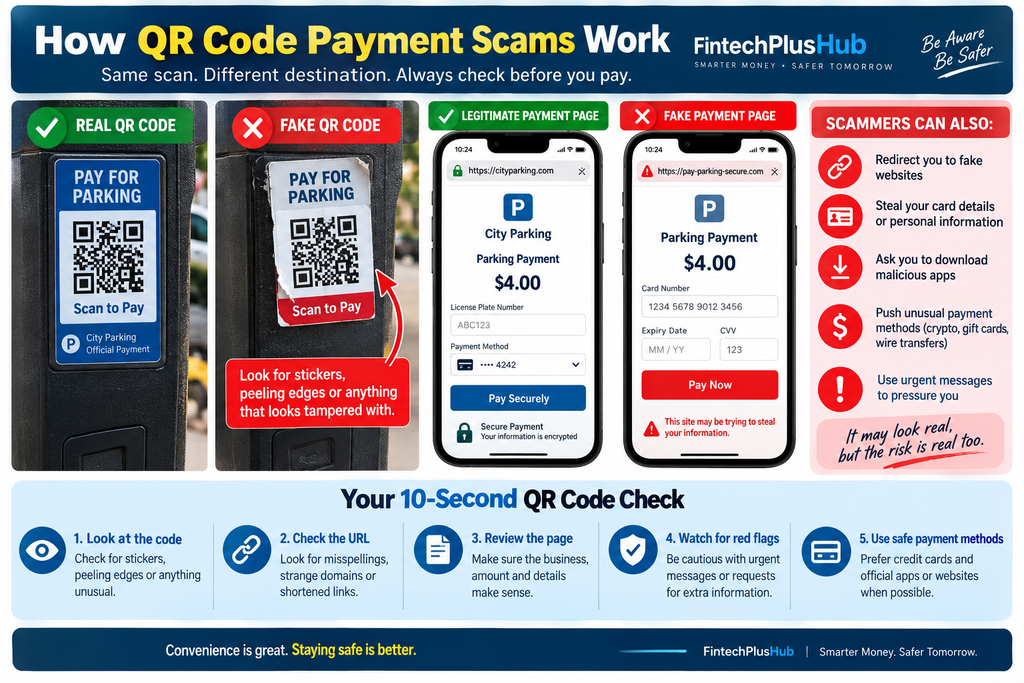
1. The QR Code Looks Like a Sticker Placed Over Something Else
Before scanning a public QR code, physically look at it.
Does the code appear to be a separate sticker?
Are its edges peeling?
Can you see another label underneath?
Does the printing quality look different from the rest of the parking meter or sign?
This is one of the simplest ways to detect some QR code payment scams.
The FTC specifically warns that scammers may cover legitimate parking-meter QR codes with codes of their own. The Better Business Bureau has also warned consumers to look for evidence that a QR sticker has been placed over an existing code.
A QR code does not automatically become trustworthy just because it is attached to something official.
Safer move: If the machine accepts a card directly, consider paying through the physical meter instead. If an official parking app or website is clearly listed separately, you can manually open that service rather than relying on an unfamiliar sticker.
2. The URL Looks Almost Right—but Not Quite
Your phone will often show you the destination URL before opening a QR link.
Take a few seconds to read it.
Look for:
- Misspelled company names
- Extra letters or numbers
- Strange domains
- Switched characters
- Unfamiliar shortened URLs
For example, a scammer may create a domain that visually resembles a real parking company but changes one letter.
When you are trying to pay quickly, that small difference is easy to miss.
The FTC recommends inspecting the URL that appears after scanning a QR code and checking for misspellings or switched letters before opening it.
Those few seconds are one of your strongest defenses against QR code payment scams.
3. The Payment Page Does Not Match the Business
Once a webpage opens, do not immediately enter your card details.
Look around first.
Ask yourself:
Does this page actually look like the company I am trying to pay?
Check the business name, logo, URL, parking location, amount, and service description.
Be suspicious if you see:
- Blurry logos
- Poorly written instructions
- Strange subscription language
- An unrelated company name
- A price that seems much higher than expected
- No information about the parking location or service
BBB has documented consumer complaints in which people believed they were paying for parking but ended up facing unrelated charges or subscription-style payments after using fraudulent QR codes.
A polished webpage is not proof that a site is legitimate.
Scam websites can look surprisingly professional.
Fraud does not always stop at fake payment pages. Scammers can also use convincing documents, so knowing how to spot AI-generated fake receipts can add another layer of protection.
4. You Are Pressured to Pay Immediately
Urgency is one of the oldest scam tactics.
QR technology simply gives scammers another way to use it.
A message might suggest:
Pay immediately to avoid a fine.
Or:
Your account will be suspended unless you scan now.
Or:
Your package cannot be delivered until payment is completed.
The problem is not simply the QR code. The combination of an unexpected QR code and pressure to act immediately is much more concerning.
FTC guidance warns consumers about QR codes sent through unexpected emails or text messages, particularly when the message tries to create urgency.
When someone is pushing you to act fast, slow down.
Open the company’s official app or manually type its known website instead.
5. The Website Asks for More Information Than the Payment Requires
Suppose you are paying a $4 parking fee.
Why would the website need your:
- Social Security number
- Email password
- Banking login
- Full identity information
- Unusual phone permissions
It probably does not.
A payment page should request information reasonably connected to the transaction.
Be particularly careful when a QR page asks you to log into another account before paying.
The FTC warns that fake QR destinations can imitate legitimate websites and steal usernames, passwords, credit card numbers, or other information entered by users.
The FBI has similarly advised people to be cautious about websites, applications, and device permissions opened through unfamiliar QR codes.
If the requested information feels excessive, close the page.
6. You Are Redirected Through Multiple Strange Websites
Another warning sign appears after you scan.
Instead of going directly to the expected payment service, your browser jumps through several pages or unfamiliar domains.
One redirect is not automatically a scam. Legitimate payment processors sometimes use different domains.
But unexpected redirects combined with other red flags deserve caution.
Especially stop if the final page suddenly asks you to:
- Download an unknown app
- Install a configuration file
- Give browser permissions
- Log into your bank
- Enter information unrelated to the payment
FTC guidance warns that malicious QR codes can direct people to spoofed websites and, in some cases, malicious software.
You do not need to complete a suspicious process simply because you already scanned the code.
Scanning is not a commitment.
Close the page and verify the payment method independently.
7. The Only Payment Options Are Difficult to Reverse
The payment method itself can tell you something.
Be especially cautious when an unexpected payment page insists on payment through methods such as cryptocurrency, wire transfer, bank transfer, gift cards, or certain person-to-person payment methods.
In July 2026, the FTC warned that scammers often push payment methods that make recovering money difficult. The FTC recommends using a credit card when possible because credit cards provide stronger dispute options than many irreversible payment methods.
This does not mean every QR payment using a payment app is fraudulent.
It means an unexpected QR code demanding an unusual or difficult-to-reverse method deserves more scrutiny.
The 10-Second QR Code Check
You do not need to become a cybersecurity expert.
Before paying through a QR code, take about ten seconds and check three things:
Look at the code.
Does it appear physically altered or covered?
Look at the URL.
Does the domain exactly match the organization you expect?
Look at the payment page.
Does the business, amount, and service actually make sense?
If one of those checks fails, do not enter your payment information.
Find another way to pay.
That tiny pause is much easier than dealing with a compromised card later.
What Should You Do if You Already Scanned a Fake QR Code?
First, scanning a suspicious QR code does not necessarily mean you have lost money.
What matters is what happened afterward.
If You Only Opened the Website
Close the page.
Do not download anything or grant permissions.
Make sure your phone’s operating system and applications are updated. The FTC recommends keeping device software updated as part of protecting against malicious QR links.
If You Entered a Password
Change that password immediately.
If you reused the same password on other accounts, change it there too.
Enable multi-factor authentication when available.
This matches FTC guidance for people who entered credentials after following a fraudulent QR link.
If You Entered Card Information
Contact your card issuer immediately using the official number on your card or inside your banking app.
Explain what happened and review recent transactions.
The FTC advises consumers who paid a scammer by credit or debit card to contact the issuer or bank quickly, report the fraudulent transaction, and ask whether the payment can be reversed.
If Money Has Already Left Your Bank Account
Contact your bank or credit union immediately.
Do not wait to see whether another fraudulent payment appears.
The Consumer Financial Protection Bureau says consumers should report unauthorized transactions promptly. Depending on the type of electronic transfer and circumstances, federal protections may apply.
Report the Scam
In the United States, fraudulent QR schemes can be reported to the FTC through ReportFraud.ftc.gov.
Suspicious cyber-enabled fraud can also be reported through the FBI’s Internet Crime Complaint Center when appropriate. The FBI specifically asks consumers to report fraudulent activity involving unsolicited QR-code schemes.
Are QR Codes Themselves Unsafe?
No.
That distinction matters.
QR codes are simply a convenient way to encode information such as a website address.
The problem is trusting the destination without checking it.
Think about QR codes like ordinary web links.
You probably would not click a strange link in an unexpected email and immediately enter your bank information.
A QR code deserves the same caution.
The square pattern may hide the address, but the security rule remains the same:
Verify where you are going before giving away money or information.
Are QR Code Payment Scams Becoming More Important?
QR codes are now part of everyday payments, tickets, restaurants, parking systems, packages, advertisements, and account logins.
That creates plenty of legitimate uses—and plenty of opportunities for impersonation.
The FTC has warned about malicious QR codes in several contexts, including public parking and unexpected packages. The FBI has also warned about QR codes appearing in unsolicited packages that may lead users into fraud schemes.
The useful lesson is not “never scan a QR code.”
It is:
Do not let convenience replace verification.
Final Thoughts: Scan the Code, Not Your Judgment
Most people scanning a parking QR code are thinking about one thing:
I just want to pay and leave.
That is exactly why this type of scam can work.
You are distracted. Maybe people are waiting behind you. Maybe you are late. Maybe the meter gives you only one obvious payment option.
A scammer does not need to fool you for an hour.
They may only need to fool you for ten seconds.
So before entering a card number, stop and inspect the QR code, destination URL, payment page, and requested payment method.
QR code payment scams work best when people act automatically. A ten-second check can interrupt that process before your money or personal information leaves your control.